1、配置完cdn后,后面更新前端资源发现每次都获取的是cdn上的缓存,无法获取正确资源。
解决:在cdn的后台设置
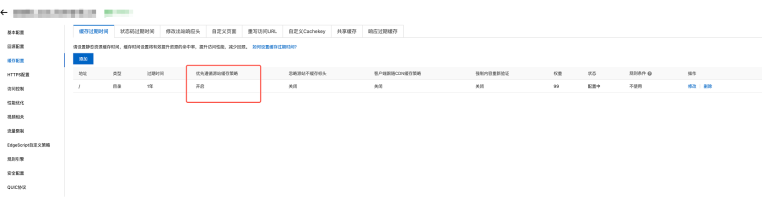
设置ng的配置参考:
# ========== static.example.com HTTPS 443端口配置 ==========
server {
    listen       443 ssl;
    server_name  static.example.com;  # 脱敏:替换为示例域名

    # 复用example.com泛域名证书(实际部署替换为自身证书路径)
    ssl_certificate      /xxx/nginx/conf/cert/your_domain.pem;  # 脱敏:隐藏真实证书路径
    ssl_certificate_key  /xxx/nginx/conf/cert/your_domain.key;  # 脱敏:隐藏真实证书路径

    # SSL安全优化(遵循行业最佳实践)
    ssl_protocols TLSv1.2 TLSv1.3;
    ssl_ciphers ECDHE-RSA-AES256-GCM-SHA512:DHE-RSA-AES256-GCM-SHA512:ECDHE-RSA-AES256-GCM-SHA384;
    ssl_prefer_server_ciphers on;
    ssl_session_cache shared:SSL:10m;
    ssl_session_timeout 10m;
    ssl_stapling on;
    ssl_stapling_verify on;

    # 1. 图片资源:30天长缓存(immutable提升浏览器缓存效率)
    location ^~ /images/ {
        alias /xxx/nginx/html/images/;  # 脱敏:隐藏真实文件路径
        autoindex off;  # 关闭目录浏览,提升安全性
        expires 30d;  # 30天 = 2592000秒
        add_header Cache-Control "public, max-age=2592000, immutable";
        add_header Access-Control-Allow-Origin $allow_origin always;  # 适配跨域场景
        add_header Access-Control-Allow-Credentials true always;
        # 支持所有常见图片类型,避免MIME类型缺失导致的访问异常
        types {
            image/jpeg jpg jpeg jpe;
            image/png png;
            image/gif gif;
            image/bmp bmp;
            image/webp webp;
            image/svg+xml svg;
            image/tiff tif tiff;
            image/x-icon ico;
            image/heic heic;
            image/heif heif;
        }
        try_files $uri $uri/ =404;  # 防止伪静态路径遍历
    }

    # 2. 精准匹配根级/page1/index.html:1分钟短缓存(前端入口文件专属)
    # 优先级最高,确保入口文件快速更新,适配CDN缓存策略
    location = /page1/index.html {
        alias /xxx/nginx/html/imusic/index.html;  # 脱敏:隐藏真实文件路径
        autoindex off;
        expires 1m;  # 1分钟 = 60秒
        add_header Cache-Control "public, max-age=60, must-revalidate";  # 过期后强制验证最新版本
        add_header Access-Control-Allow-Origin $allow_origin always;
        add_header Access-Control-Allow-Credentials true always;
        try_files $uri =404;
    }

    # 3. 正则匹配所有imusic子目录下的index.html:1分钟短缓存
    # 覆盖 /page1/*/index.html、/page1/*/*/index.html 等多级子目录场景
    location ~ ^/page1/.*/index\.html$ {
        alias /xxx/nginx/html/$uri;  # $uri自动匹配完整请求路径,无需手动拼接
        autoindex off;
        expires 1m;  # 1分钟 = 60秒
        add_header Cache-Control "public, max-age=60, must-revalidate";
        add_header Access-Control-Allow-Origin $allow_origin always;
        add_header Access-Control-Allow-Credentials true always;
        try_files $uri =404;
    }

    # 4. page1下所有静态资源(JS/CSS/字体等):1年长缓存
    # 优先级低于index.html匹配规则,仅匹配非入口文件的静态资源
    # 需配合前端构建工具(Vite/Webpack)生成哈希文件名,确保更新生效
    location ^~ /page1/ {
        alias /xxx/nginx/html/page1/;  # 脱敏:隐藏真实文件路径
        index index.html index.htm;
        autoindex off;
        expires 1y;  # 1年 = 31536000秒
        add_header Cache-Control "public, max-age=31536000, immutable";  # 禁止浏览器重复验证
        add_header Access-Control-Allow-Origin $allow_origin always;
        add_header Access-Control-Allow-Credentials true always;
        # 支持前端项目常见静态文件类型,覆盖绝大多数场景
        types {
            text/html html htm;
            text/css css;
            application/javascript js;
            application/json json;
            text/xml xml;
            image/jpeg jpg jpeg;
            image/png png;
            image/gif gif;
            image/webp webp;
            font/woff2 woff2;
            font/woff woff;  # 保留标准MIME类型,避免重复定义警告
            font/ttf ttf;
            image/svg+xml svg;
            application/font-otf otf;
            text/plain txt;
            application/octet-stream bin;
            audio/mpeg mp3;
            audio/ogg ogg;
            video/mp4 mp4;
        }
        try_files $uri $uri/ =404;
    }

    # 5. 其他未匹配路径:返回404,限制访问范围,降低安全风险
    location / {
        return 404;
    }

    # 6. 50x错误页面配置:禁用缓存,确保用户看到最新错误提示
    error_page   500 502 503 504  /50x.html;
    location = /50x.html {
        root   html;
        expires -1;
        add_header Cache-Control "no-cache, no-store, must-revalidate";
    }

    # 7. 禁止访问敏感文件(如.htaccess、.git等),防止泄露服务器信息
    location ~ /\.(ht|git|svn|log) {
        deny  all;
        access_log off;
        log_not_found off;
    }
}
vite配置:
import { defineConfig } from 'vite'
import vue from '@vitejs/plugin-vue'
import path from 'path'
// 生成唯一时间戳(精确到毫秒,确保每次打包都不同)
const buildTimestamp = new Date().getTime()

// https://vitejs.dev/config/
export default defineConfig({
  plugins: [vue()],
  base: './', // 保持相对路径,无需关心CDN地址
  resolve: {
    alias: {
      '@': path.resolve(__dirname, 'src')
    }
  },
  build: {
    assetsDir: 'assets',
    outDir: 'dist',
    assetsInlineLimit: 4096,
    // 禁用打包缓存,确保每次打包重新计算哈希/时间戳
    cache: false,
    rollupOptions: {
      output: {
        // 方案1:时间戳 + contenthash(推荐,双重保证唯一性)
        assetFileNames: `assets/[name].${buildTimestamp}.[contenthash].[ext]`,
        chunkFileNames: `assets/[name].${buildTimestamp}.[contenthash].js`,
        entryFileNames: `assets/[name].${buildTimestamp}.[contenthash].js`,

        // 方案2:仅时间戳(极简,绝对唯一,可选)
        // assetFileNames: `assets/[name].${buildTimestamp}.[ext]`,
        // chunkFileNames: `assets/[name].${buildTimestamp}.js`,
        // entryFileNames: `assets/[name].${buildTimestamp}.js`
      }
    },
    sourcemap: false
  },
  server: {
    proxy: {
      '/api': {
        target: 'http://localhost:8080',
        changeOrigin: true,
        rewrite: (path) => path.replace('/api', '') // 修复代理路径
      }
    }
  }
})