强制推送到远程服务端:git push -f
能访问github网页但git clone不下来_网页可以访问git无法
2023-08-11 start
git config --global http.proxy 127.0.0.1:8001
关闭:git config --global --unset http.proxy
git config --list
end
2025-12-24 start:
# 生成 SSH Key
ssh-keygen -t rsa -b 4096 -C "你的邮箱@example.com"

# 按提示操作:
# Enter file in which to save the key (/c/Users/用户名/.ssh/id_rsa): [直接回车]
# Enter passphrase (empty for no passphrase): [设置密码或直接回车跳过]
# Enter same passphrase again: [确认密码或回车]
在你的目录下打开:C:\Users\ADMIN\.ssh
输入id_rsa.pub里的内容
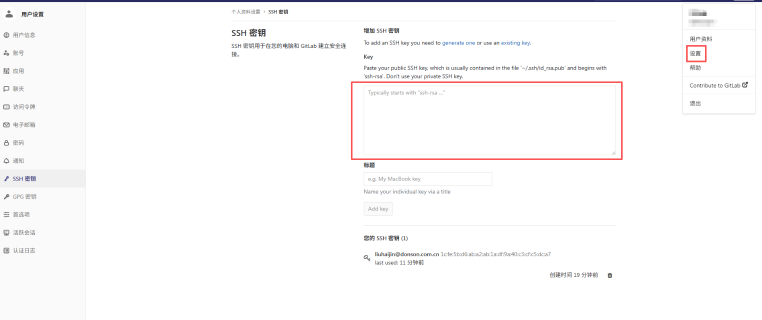
然后再idea中配置:
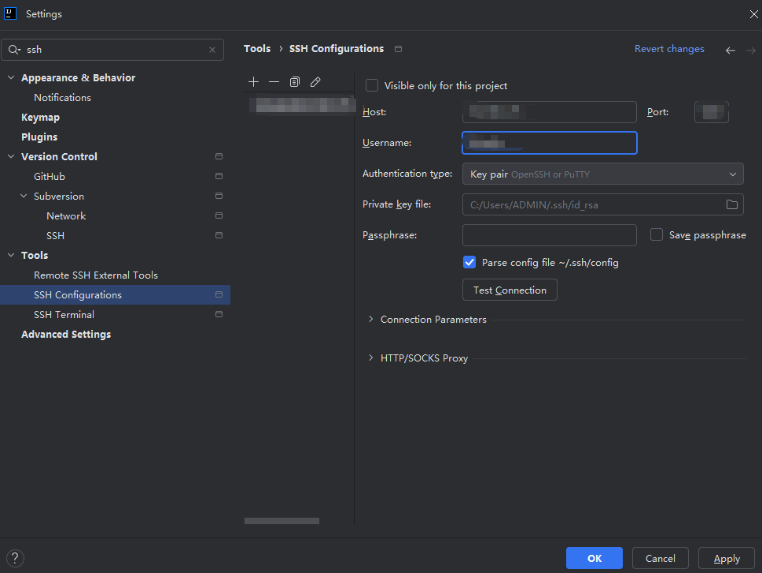
然后再拉代码即可,注意要使用ssh拉取代码
end