App.jsx:
import { useEffect, useState } from 'react'
import ChildMessage from './components/ChildMessage.jsx'
import './App.css'

/** 父组件:自己维护状态,把值通过属性传给子组件 */
export default function App() {
  const [count, setCount] = useState(0)

  useEffect(() => {
    document.title = '父传子 props 示例'
  }, [])

  return (
    <main className="app">
      <h1>父组件 → 子组件(props)</h1>
      <p className="hint">
        下面卡片是<strong>子组件</strong>,它不负责定义 <code>count</code>,只读父组件传入的{' '}
        <code>title</code> 与 <code>count</code>。
      </p>

      <div className="actions">
        <button type="button" onClick={() => setCount((c) => c - 1)}>
          父:−1
        </button>
        <button type="button" onClick={() => setCount((c) => c + 1)}>
          父:+1
        </button>
      </div>

      <ChildMessage title="我是子组件" count={count} />
    </main>
  )
}
ChildMessage.jsx:
export default function ChildMessage({ title, count }) {
  return (
    <div className="child">
      <p className="child__title">{title}</p>
      <p className="child__text">
        父组件传来的 <code>count</code>:<strong>{count}</strong>
      </p>
    </div>
  )
}
App.css:
.app {
  max-width: 28rem;
  margin: 2.5rem auto;
  padding: 0 1.25rem;
  font-family: system-ui, sans-serif;
  line-height: 1.55;
  color: #1a1a1a;
}

.app h1 {
  font-size: 1.25rem;
  font-weight: 650;
  margin: 0 0 0.75rem;
}

.hint {
  margin: 0 0 1rem;
  font-size: 0.92rem;
  color: #555;
}

.hint code {
  font-size: 0.88em;
  background: #f3f4f6;
  padding: 0.08em 0.35em;
  border-radius: 4px;
}

.actions {
  display: flex;
  gap: 0.65rem;
  margin-bottom: 1.25rem;
}

.actions button {
  padding: 0.45rem 0.95rem;
  font-size: 0.95rem;
  cursor: pointer;
  border: 1px solid #ccc;
  border-radius: 6px;
  background: #fff;
}

.actions button:hover {
  background: #f9fafb;
}

.child {
  border: 1px solid #e5e7eb;
  border-radius: 10px;
  padding: 1rem 1.15rem;
  background: #fafafa;
}

.child__title {
  margin: 0 0 0.5rem;
  font-size: 1rem;
  font-weight: 600;
}

.child__text {
  margin: 0;
  font-size: 0.95rem;
}

.child__text code {
  font-size: 0.88em;
  background: #e5e7eb;
  padding: 0.08em 0.35em;
  border-radius: 4px;
}
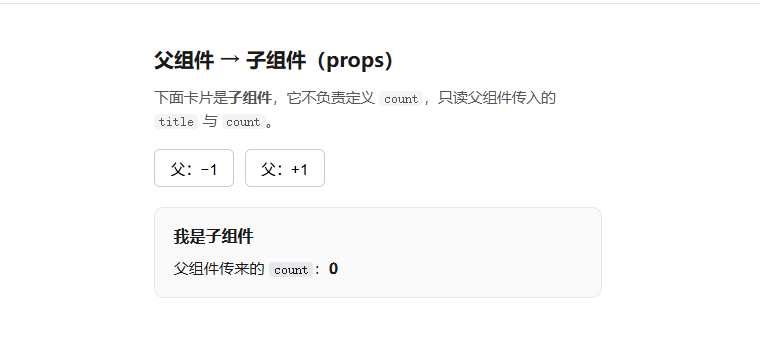
相关知识点总结:
通信方向:数据由父组件传递给子组件,是 React 最基础的组件通信方式

传值方式:父组件通过自定义属性的形式,将数据挂载在子组件标签上

接收方式:子组件通过props 参数接收父组件传递的所有数据

数据特性:props 是只读的,子组件不能直接修改,只能由父组件更新

响应式:父组件状态(count)改变 → props 自动更新 → 子组件重新渲染

核心作用:实现组件数据共享和复用,保持组件职责单一

使用场景:父组件维护状态,子组件专注展示 / 接收数据