App.jsx:
import { useEffect, useState } from 'react'
import './App.css'
const BTN_ACTIVE = 'btn-pressed'
/** 列表项必须有稳定且唯一的 id,供 key 使用(不要用列表顺序当身份) */
const TODO_SEED = [
{ id: 'jsx-syntax', title: '搞懂 JSX 语法', done: true },
{ id: 'jsx-key', title: '理解列表 key', done: false },
{ id: 'jsx-condition', title: '练习条件渲染', done: false },
]
export default function App() {
const [count, setCount] = useState(0)
const [showBonus, setShowBonus] = useState(false)
const [role, setRole] = useState('guest')
const doubled = count * 2
const nowLabel = new Date().toLocaleTimeString()
useEffect(() => {
document.title = 'JSX 入门示例'
}, [])
return (
<main className="app">
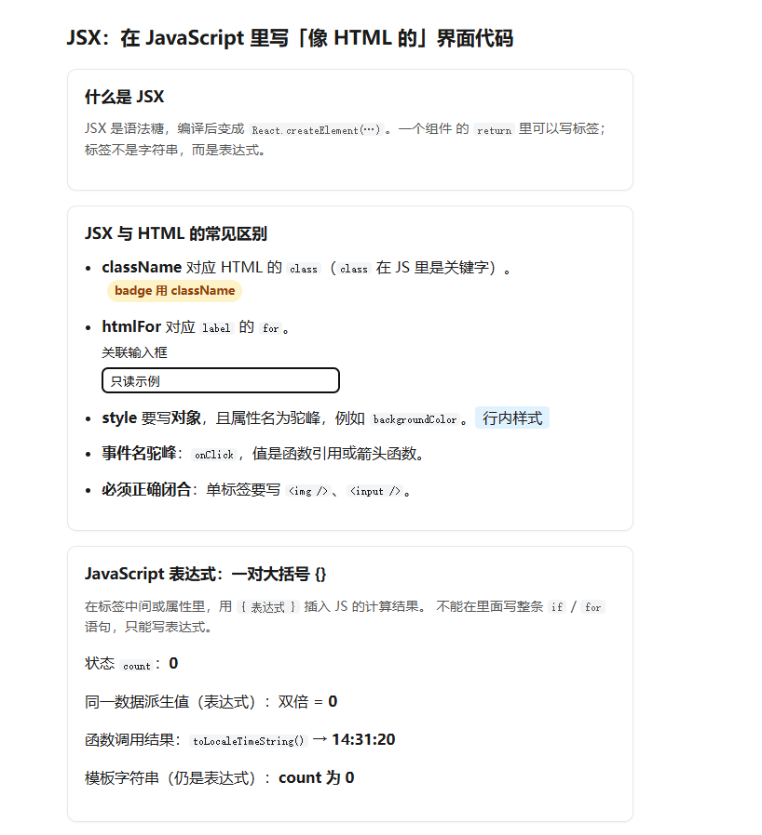
<h1>JSX:在 JavaScript 里写「像 HTML 的」界面代码</h1>
<section className="card" aria-labelledby="what-jsx">
<h2 id="what-jsx">什么是 JSX</h2>
<p className="hint">
JSX 是语法糖,编译后变成 <code>React.createElement(…)</code>。一个组件
的 <code>return</code> 里可以写标签;标签不是字符串,而是表达式。
</p>
</section>
<section className="card" aria-labelledby="jsx-vs-html">
<h2 id="jsx-vs-html">JSX 与 HTML 的常见区别</h2>
<ul className="diff-list">
<li>
<strong>className</strong> 对应 HTML 的 <code>class</code>(
<code>class</code> 在 JS 里是关键字)。
<span className="badge demo-class">badge 用 className</span>
</li>
<li>
<strong>htmlFor</strong> 对应 <code>label</code> 的 <code>for</code>。
<label className="block" htmlFor="demo-input">
关联输入框
</label>
<input id="demo-input" className="input" type="text" readOnly value="只读示例" />
</li>
<li>
<strong>style</strong> 要写<strong>对象</strong>,且属性名为驼峰,例如{' '}
<code>backgroundColor</code>。
<span style={{ padding: '2px 8px', backgroundColor: '#e0f2fe', borderRadius: '4px' }}>
行内样式
</span>
</li>
<li>
<strong>事件名驼峰</strong>:<code>onClick</code>,值是函数引用或箭头函数。
</li>
<li>
<strong>必须正确闭合</strong>:单标签要写 <code><img /></code>、
<code><input /></code>。
</li>
</ul>
</section>
<section className="card" aria-labelledby="expr">
<h2 id="expr">JavaScript 表达式:一对大括号 {'{}'}</h2>
<p className="hint">
在标签中间或属性里,用 <code>{'{ 表达式 }'}</code> 插入 JS 的计算结果。
不能在里面写整条 <code>if</code> / <code>for</code> 语句,只能写表达式。
</p>
<p>
状态 <code>count</code>:<strong>{count}</strong>
</p>
<p>
同一数据派生值(表达式):双倍 = <strong>{doubled}</strong>
</p>
<p>
函数调用结果:<code>toLocaleTimeString()</code> → <strong>{nowLabel}</strong>
</p>
<p>
模板字符串(仍是表达式):<strong>{`count 为 ${count}`}</strong>
</p>
</section>
<section className="card" aria-labelledby="condition">
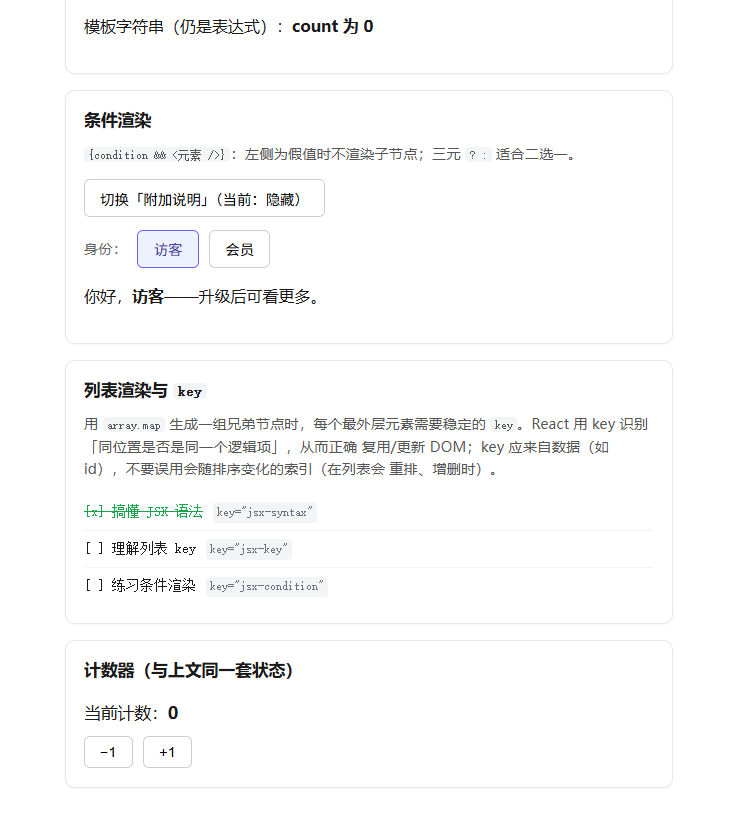
<h2 id="condition">条件渲染</h2>
<p className="hint">
<code>{'{condition && <元素 />}'}</code>:左侧为假值时不渲染子节点;三元{' '}
<code>? :</code> 适合二选一。
</p>
<div className="actions">
<button type="button" onClick={() => setShowBonus((v) => !v)}>
切换「附加说明」{showBonus ? '(当前:显示)' : '(当前:隐藏)'}
</button>
</div>
{showBonus && (
<p className="callout">
这一段只有在 <code>showBonus === true</code> 时才会出现在 DOM 里。
</p>
)}
<div className="actions row-gap">
<span className="muted">身份:</span>
<button
type="button"
className={role === 'guest' ? BTN_ACTIVE : ''}
onClick={() => setRole('guest')}
>
访客
</button>
<button
type="button"
className={role === 'member' ? BTN_ACTIVE : ''}
onClick={() => setRole('member')}
>
会员
</button>
</div>
<p>
{role === 'member' ? (
<>你好,<strong>会员</strong>专属内容可见。</>
) : (
<>你好,<strong>访客</strong>——升级后可看更多。</>
)}
</p>
</section>
<section className="card" aria-labelledby="list">
<h2 id="list">列表渲染与 <code>key</code></h2>
<p className="hint">
用 <code>array.map</code> 生成一组兄弟节点时,每个最外层元素需要稳定的{' '}
<code>key</code>。React 用 key 识别「同位置是否是同一个逻辑项」,从而正确
复用/更新 DOM;key 应来自数据(如 id),不要误用会随排序变化的索引(在列表会
重排、增删时)。
</p>
<ul className="todo-list">
{TODO_SEED.map((todo) => (
<li key={todo.id}>
<span className={todo.done ? 'todo done' : 'todo'}>
[{todo.done ? 'x' : ' '}] {todo.title}
</span>
<code className="key-tag">key="{todo.id}"</code>
</li>
))}
</ul>
</section>
<section className="card" aria-labelledby="counter">
<h2 id="counter">计数器(与上文同一套状态)</h2>
<p className="count">
当前计数:<strong>{count}</strong>
</p>
<div className="actions">
<button type="button" onClick={() => setCount((c) => c - 1)}>
−1
</button>
<button type="button" onClick={() => setCount((c) => c + 1)}>
+1
</button>
</div>
</section>
</main>
)
}
App.css:
.app {
  max-width: 38rem;
  margin: 0 auto;
  padding: 2rem 1.25rem 3rem;
  font-family: system-ui, sans-serif;
  line-height: 1.55;
  color: #1a1a1a;
}

.app > h1 {
  font-size: 1.3rem;
  font-weight: 650;
  margin: 0 0 1.25rem;
  line-height: 1.35;
}

.card {
  border: 1px solid #e5e7eb;
  border-radius: 10px;
  padding: 1rem 1.15rem 1.15rem;
  margin-bottom: 1rem;
  background: #fff;
  box-shadow: 0 1px 2px rgb(0 0 0 / 4%);
}

.card h2 {
  font-size: 1.05rem;
  font-weight: 600;
  margin: 0 0 0.65rem;
}

.hint {
  color: #555;
  font-size: 0.9rem;
  margin: 0 0 0.85rem;
}

.hint code,
.card code {
  font-size: 0.85em;
  background: #f3f4f6;
  padding: 0.08em 0.35em;
  border-radius: 4px;
}

.diff-list {
  margin: 0;
  padding-left: 1.15rem;
}

.diff-list li {
  margin-bottom: 0.85rem;
}

.diff-list li strong {
  font-weight: 600;
}

.badge.demo-class {
  display: inline-block;
  margin-left: 0.35rem;
  font-size: 0.8rem;
  font-weight: 600;
  padding: 2px 8px;
  background: #fef3c7;
  color: #92400e;
  border-radius: 999px;
}

.block {
  display: block;
  margin-top: 0.35rem;
  font-size: 0.88rem;
}

.input {
  margin-top: 0.25rem;
  width: 100%;
  max-width: 16rem;
  padding: 0.35rem 0.5rem;
  border: 1px solid #ccc;
  border-radius: 6px;
  box-sizing: border-box;
}

.callout {
  margin: 0.75rem 0 0;
  padding: 0.65rem 0.75rem;
  background: #f0fdf4;
  border: 1px solid #bbf7d0;
  border-radius: 8px;
  font-size: 0.92rem;
}

.muted {
  color: #666;
  font-size: 0.9rem;
}

.actions {
  display: flex;
  flex-wrap: wrap;
  align-items: center;
  gap: 0.65rem;
}

.actions.row-gap {
  margin: 0.85rem 0 0.5rem;
}

.actions button {
  padding: 0.45rem 0.95rem;
  font-size: 0.9rem;
  cursor: pointer;
  border: 1px solid #ccc;
  border-radius: 6px;
  background: #fff;
}

.actions button:hover {
  background: #f9fafb;
}

.actions button.btn-pressed {
  border-color: #6366f1;
  background: #eef2ff;
  color: #3730a3;
}

.count {
  font-size: 1.05rem;
  margin-bottom: 0.65rem;
}

.todo-list {
  margin: 0;
  padding-left: 0;
  list-style: none;
}

.todo-list li {
  display: flex;
  flex-wrap: wrap;
  align-items: baseline;
  gap: 0.5rem 0.65rem;
  padding: 0.45rem 0;
  border-bottom: 1px solid #f3f4f6;
}

.todo-list li:last-child {
  border-bottom: none;
}

.todo {
  font-family: ui-monospace, monospace;
  font-size: 0.88rem;
}

.todo.done {
  color: #16a34a;
  text-decoration: line-through;
}

.key-tag {
  font-size: 0.78rem;
  color: #6b7280;
  background: transparent;
}
相关知识点总结:
JSX 本质:JavaScript 语法糖,编译为 React.createElement,可在 JS 中编写界面结构

与 HTML 差异:使用 className 代替 class、htmlFor 代替 for;单标签必须闭合

行内样式:style 接收对象,属性采用驼峰命名(如 backgroundColor)

表达式插值:通过 { } 嵌入变量、计算、函数调用等 JS 表达式

条件渲染:支持 && 短路渲染、三元运算符 二选一渲染

列表渲染:使用 map 遍历生成列表,必须绑定唯一稳定 key(推荐用数据 id)

事件绑定:事件名采用驼峰格式(如 onClick),值为函数 / 箭头函数

状态驱动:结合 useState 定义状态,useEffect 处理副作用,状态更新自动刷新视图

片段语法:使用 <> 空标签包裹多元素,不产生额外 DOM 节点