App.jsx:
import { useEffect, useState } from 'react'
import './App.css'

export default function App() {
  const [count, setCount] = useState(0)
  const [eventHint, setEventHint] = useState('点击下面按钮查看合成事件信息')
  const [bubbleLog, setBubbleLog] = useState([])
  const [formStatus, setFormStatus] = useState('')
  const [linkMsg, setLinkMsg] = useState('')

  useEffect(() => {
    document.title = 'React 事件处理'
  }, [])

  const pushBubble = (line) => {
    setBubbleLog((prev) => [...prev, `${new Date().toLocaleTimeString()} ${line}`])
  }

  return (
    <main className="app">
      <h1>React 事件处理</h1>
      <p className="hint">
        React 用<strong>驼峰</strong>属性绑定事件(如 <code>onClick</code>、<code>onSubmit</code>
        )。处理函数会收到<strong>合成事件</strong>对象 <code>e</code>(含 <code>preventDefault</code>、
        <code>stopPropagation</code> 等)。
      </p>

      <section className="card">
        <h2>1. 事件绑定</h2>
        <p className="hint">
          传入<strong>函数引用</strong>或<strong>箭头函数</strong>,不要加括号直接调用(除非要立即执行)。
        </p>
        <p className="count">
          计数:<strong>{count}</strong>
        </p>
        <div className="actions">
          <button type="button" onClick={() => setCount((c) => c + 1)}>
            onClick:+1
          </button>
        </div>
      </section>

      <section className="card">
        <h2>2. 事件对象 e</h2>
        <p className="hint">
          第一个参数是合成事件:<code>e.type</code>、<code>e.currentTarget</code>(绑定监听的元素)等。
        </p>
        <p className="mono">{eventHint}</p>
        <div className="actions">
          <button
            type="button"
            onClick={(e) => {
              setEventHint(
                `e.type = ${e.type};e.currentTarget = <${e.currentTarget.tagName.toLowerCase()}>`,
              )
            }}
          >
            点我读取 e
          </button>
        </div>
      </section>

      <section className="card">
        <h2>3. 阻止默认行为 preventDefault</h2>
        <p className="hint">
          表单提交、链接跳转等会有浏览器<strong>默认行为</strong>,可用 <code>e.preventDefault()</code>{' '}
          取消。
        </p>
        <form
          className="demo-form"
          onSubmit={(e) => {
            e.preventDefault()
            setFormStatus('已执行 e.preventDefault(),不会整页刷新。')
          }}
        >
          <input className="input" name="q" placeholder="随便输入" />
          <button type="submit">提交(已拦截默认提交)</button>
        </form>
        {formStatus ? <p className="mono">{formStatus}</p> : null}

        <p className="hint sub">链接示例:</p>
        <p>
          <a
            className="demo-link"
            href="https://example.com"
            onClick={(e) => {
              e.preventDefault()
              setLinkMsg('已阻止跳转 example.com(默认会被打开)')
            }}
          >
            example.com(点我只会更新下面一行字)
          </a>
        </p>
        {linkMsg ? <p className="mono">{linkMsg}</p> : null}
      </section>

      <section className="card">
        <h2>4. 阻止冒泡 stopPropagation</h2>
        <p className="hint">
          事件从里到外会<strong>冒泡</strong>。内层按钮若调用 <code>e.stopPropagation()</code>,外层{' '}
          <code>onClick</code> 不会收到这次点击。
        </p>
        <div
          className="bubble-outer"
          onClick={() => pushBubble('外层 div 收到点击')}
          role="presentation"
        >
          <p className="bubble-caption">外层(点击空白区域只会触发外层)</p>
          <div className="actions wrap">
            <button
              type="button"
              onClick={(e) => {
                e.stopPropagation()
                pushBubble('内层 A:stopPropagation → 外层不会触发')
              }}
            >
              内层 A:阻止冒泡
            </button>
            <button
              type="button"
              onClick={() => {
                pushBubble('内层按钮 B:未阻止冒泡 → 还会触发外层')
              }}
            >
              内层 B:允许冒泡
            </button>
          </div>
        </div>
        <button
          type="button"
          className="btn-ghost"
          onClick={() => setBubbleLog([])}
        >
          清空日志
        </button>
        <ul className="log">
          {bubbleLog.map((line, i) => (
            <li key={i}>{line}</li>
          ))}
        </ul>
      </section>
    </main>
  )
}
App.css:
.app {
  max-width: 36rem;
  margin: 0 auto;
  padding: 2rem 1.25rem 2.5rem;
  font-family: system-ui, sans-serif;
  line-height: 1.55;
  color: #1a1a1a;
}

.app > h1 {
  font-size: 1.28rem;
  font-weight: 650;
  margin: 0 0 0.65rem;
}

.hint {
  margin: 0 0 0.85rem;
  font-size: 0.9rem;
  color: #555;
}

.hint.sub {
  margin-top: 1rem;
  margin-bottom: 0.4rem;
}

.hint code,
.card code {
  font-size: 0.85em;
  background: #f3f4f6;
  padding: 0.08em 0.35em;
  border-radius: 4px;
}

.card {
  border: 1px solid #e5e7eb;
  border-radius: 10px;
  padding: 1rem 1.15rem 1.15rem;
  margin-bottom: 1rem;
  background: #fff;
  box-shadow: 0 1px 2px rgb(0 0 0 / 4%);
}

.card h2 {
  font-size: 1.05rem;
  font-weight: 600;
  margin: 0 0 0.5rem;
}

.count {
  margin: 0 0 0.65rem;
  font-size: 1rem;
}

.mono {
  margin: 0.5rem 0 0;
  font-family: ui-monospace, 'Cascadia Code', monospace;
  font-size: 0.88rem;
  word-break: break-word;
}

.actions {
  display: flex;
  flex-wrap: wrap;
  gap: 0.65rem;
}

.actions.wrap {
  margin-top: 0.5rem;
}

.actions button {
  padding: 0.45rem 0.95rem;
  font-size: 0.92rem;
  cursor: pointer;
  border: 1px solid #ccc;
  border-radius: 6px;
  background: #fff;
}

.actions button:hover {
  background: #f9fafb;
}

.demo-form {
  display: flex;
  flex-wrap: wrap;
  gap: 0.5rem;
  align-items: center;
}

.input {
  flex: 1;
  min-width: 10rem;
  padding: 0.4rem 0.55rem;
  border: 1px solid #ccc;
  border-radius: 6px;
  font-size: 0.95rem;
}

.demo-link {
  color: #2563eb;
  text-decoration: underline;
}

.bubble-outer {
  border: 2px solid #93c5fd;
  border-radius: 10px;
  padding: 0.75rem 1rem 1rem;
  background: #eff6ff;
  cursor: default;
}

.bubble-caption {
  margin: 0 0 0.35rem;
  font-size: 0.86rem;
  color: #1e40af;
}

.btn-ghost {
  margin-top: 0.65rem;
  padding: 0.35rem 0.75rem;
  font-size: 0.85rem;
  cursor: pointer;
  border: none;
  background: transparent;
  color: #6b7280;
  text-decoration: underline;
}

.log {
  margin: 0.65rem 0 0;
  padding-left: 1.15rem;
  font-size: 0.85rem;
  color: #374151;
}

.log li {
  margin-bottom: 0.25rem;
}
相关知识点总结:
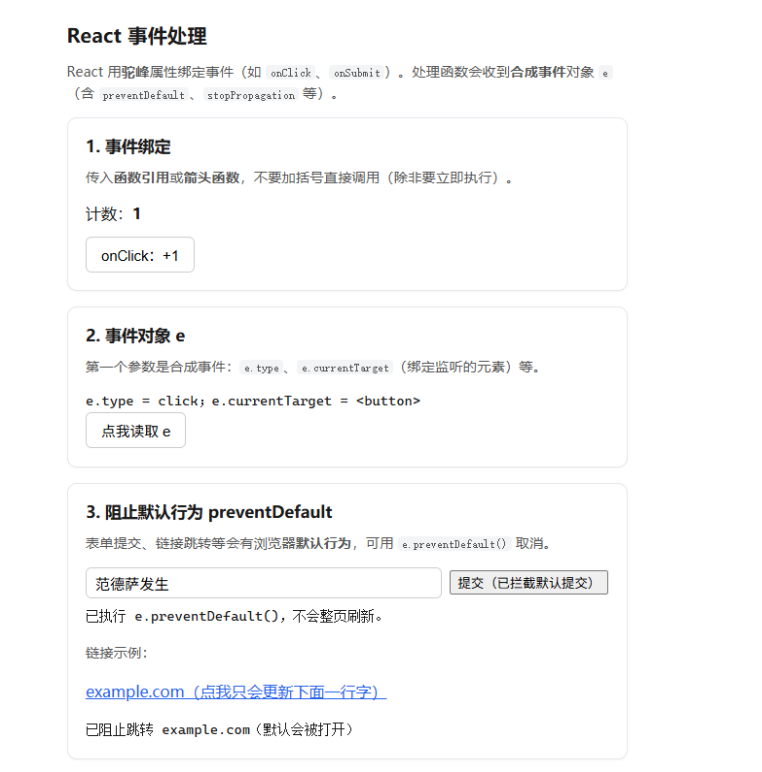
事件命名:采用驼峰式写法(onClick/onSubmit),区别于原生小写事件

绑定方式:绑定函数引用或箭头函数,不能直接调用函数(避免自动执行)

合成事件:React 封装合成事件对象 e,兼容所有浏览器,用法和原生事件一致

事件对象:可通过 e 获取 e.type/e.currentTarget 等事件信息

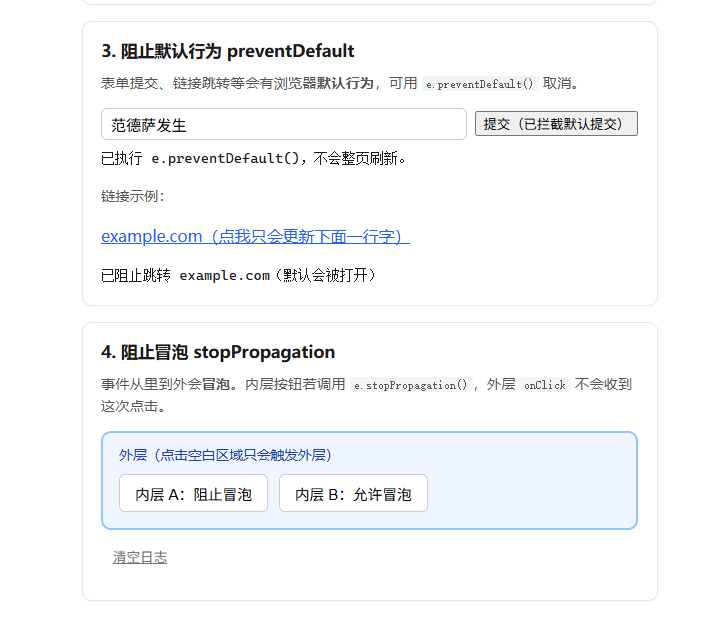
阻止默认行为:使用 e.preventDefault(),禁止表单刷新、链接跳转等默认行为

阻止事件冒泡:使用 e.stopPropagation(),防止事件向外层元素传递

状态更新:事件中通过 setState 更新状态,实现状态驱动视图