App.jsx:
import { useEffect, useState } from 'react'
import './App.css'

/** 函数式组件:用函数声明,内部可用 Hooks(本段演示状态驱动视图) */
function StateDrivesView({ count, setCount }) {
  const doubled = count * 2
  return (
    <section className="card">
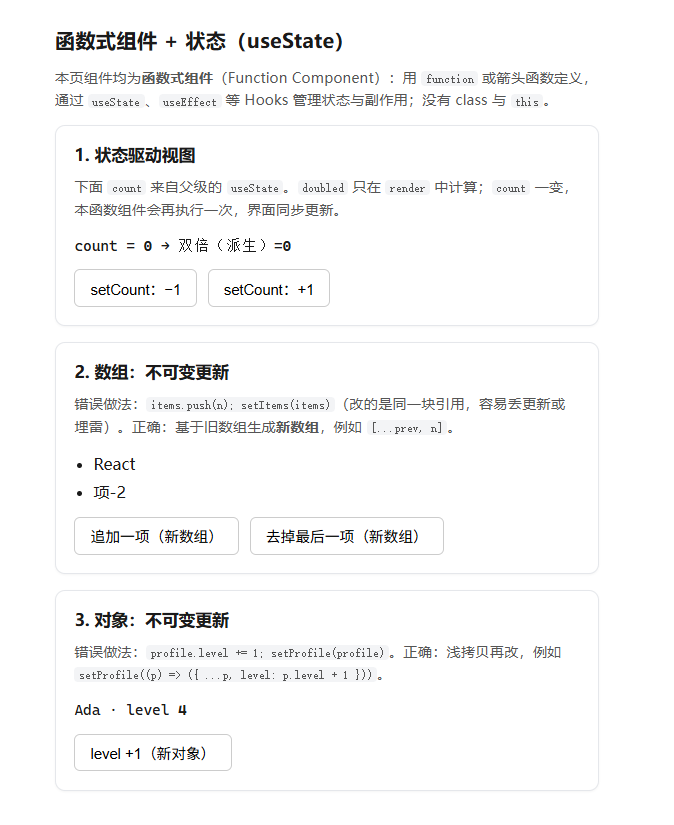
      <h2>1. 状态驱动视图</h2>
      <p className="hint">
        下面 <code>count</code> 来自父级的 <code>useState</code>。<code>doubled</code> 只在{' '}
        <code>render</code> 中计算;<code>count</code> 一变,本函数组件会再执行一次,界面同步更新。
      </p>
      <p className="mono">
        count = <strong>{count}</strong> → 双倍(派生)=<strong>{doubled}</strong>
      </p>
      <div className="actions">
        <button type="button" onClick={() => setCount((c) => c - 1)}>
          setCount:−1
        </button>
        <button type="button" onClick={() => setCount((c) => c + 1)}>
          setCount:+1
        </button>
      </div>
    </section>
  )
}

/** 函数式组件:数组 state 的不可变更新 */
function ImmutableListDemo({ tags, setTags }) {
  return (
    <section className="card">
      <h2>2. 数组:不可变更新</h2>
      <p className="hint">
        错误做法:<code>items.push(n); setItems(items)</code>(改的是同一块引用,容易丢更新或埋雷)。正确:基于旧数组生成<strong>新数组</strong>
        ,例如 <code>[...prev, n]</code>。
      </p>
      <ul className="list">
        {tags.map((t) => (
          <li key={t.id}>{t.text}</li>
        ))}
      </ul>
      <div className="actions">
        <button
          type="button"
          onClick={() =>
            setTags((prev) => [
              ...prev,
              { id: `t-${Date.now()}`, text: `项-${prev.length + 1}` },
            ])
          }
        >
          追加一项(新数组)
        </button>
        <button type="button" onClick={() => setTags((prev) => prev.slice(0, -1))}>
          去掉最后一项(新数组)
        </button>
      </div>
    </section>
  )
}

/** 函数式组件:对象 state 的不可变更新 */
function ImmutableObjectDemo({ profile, setProfile }) {
  return (
    <section className="card">
      <h2>3. 对象:不可变更新</h2>
      <p className="hint">
        错误做法:<code>profile.level += 1; setProfile(profile)</code>。正确:浅拷贝再改,例如{' '}
        <code>{`setProfile((p) => ({ ...p, level: p.level + 1 }))`}</code>。
      </p>
      <p className="mono">
        {profile.name} · level <strong>{profile.level}</strong>
      </p>
      <div className="actions">
        <button
          type="button"
          onClick={() =>
            setProfile((p) => ({
              ...p,
              level: p.level + 1,
            }))
          }
        >
          level +1(新对象)
        </button>
      </div>
    </section>
  )
}

/** 根函数式组件:在顶层用 useState / useEffect,把状态通过 props 下发给子函数组件 */
export default function App() {
  const [count, setCount] = useState(0)
  const [tags, setTags] = useState([
    { id: 't1', text: 'React' },
    { id: 't2', text: 'useState' },
  ])
  const [profile, setProfile] = useState({ name: 'Ada', level: 1 })

  useEffect(() => {
    document.title = `State 示例 · count=${count}`
  }, [count])

  return (
    <main className="app">
      <h1>函数式组件 + 状态(useState)</h1>
      <p className="hint">
        本页组件均为<strong>函数式组件</strong>(Function Component):用 <code>function</code> 或箭头函数定义,通过{' '}
        <code>useState</code>、<code>useEffect</code> 等 Hooks 管理状态与副作用;没有 class 与{' '}
        <code>this</code>。
      </p>

      <StateDrivesView count={count} setCount={setCount} />
      <ImmutableListDemo tags={tags} setTags={setTags} />
      <ImmutableObjectDemo profile={profile} setProfile={setProfile} />
    </main>
  )
}
App.css:
.app {
  max-width: 34rem;
  margin: 0 auto;
  padding: 2rem 1.25rem 2.5rem;
  font-family: system-ui, sans-serif;
  line-height: 1.55;
  color: #1a1a1a;
}

.app > h1 {
  font-size: 1.28rem;
  font-weight: 650;
  margin: 0 0 0.65rem;
}

.hint {
  margin: 0 0 0.85rem;
  font-size: 0.9rem;
  color: #555;
}

.hint code,
.card code {
  font-size: 0.85em;
  background: #f3f4f6;
  padding: 0.08em 0.35em;
  border-radius: 4px;
}

.card {
  border: 1px solid #e5e7eb;
  border-radius: 10px;
  padding: 1rem 1.15rem 1.15rem;
  margin-bottom: 1rem;
  background: #fff;
  box-shadow: 0 1px 2px rgb(0 0 0 / 4%);
}

.card h2 {
  font-size: 1.05rem;
  font-weight: 600;
  margin: 0 0 0.5rem;
}

.card > .hint:first-of-type {
  margin-top: 0;
}

.mono {
  margin: 0 0 0.75rem;
  font-family: ui-monospace, 'Cascadia Code', monospace;
  font-size: 0.92rem;
}

.list {
  margin: 0 0 0.75rem;
  padding-left: 1.2rem;
}

.list li {
  margin-bottom: 0.25rem;
}

.actions {
  display: flex;
  flex-wrap: wrap;
  gap: 0.65rem;
}

.actions button {
  padding: 0.45rem 0.95rem;
  font-size: 0.92rem;
  cursor: pointer;
  border: 1px solid #ccc;
  border-radius: 6px;
  background: #fff;
}

.actions button:hover {
  background: #f9fafb;
}
相关知识点总结:
状态驱动视图:useState 定义响应式状态,状态变化 → 组件重新渲染,界面自动更新

派生状态:直接在渲染函数中通过现有状态计算(如 doubled = count * 2),无需额外状态

状态不可变原则:React 状态不能直接修改,必须返回新值 / 新引用

数组不可变更新:使用展开运算符 [...prev]、slice 等生成新数组,禁止 push/pop 直接修改

对象不可变更新:使用展开运算符 {...prev} 浅拷贝生成新对象,禁止直接修改属性

函数式更新:setState(prev => 新值) 可安全获取上一次状态,适合依赖旧值的场景

组件通信:顶层组件管理状态,通过 props 将状态和修改方法下发给子组件

副作用:useEffect 监听状态变化,执行标题修改等操作